Spelling Games for Kids🔤Spell It!
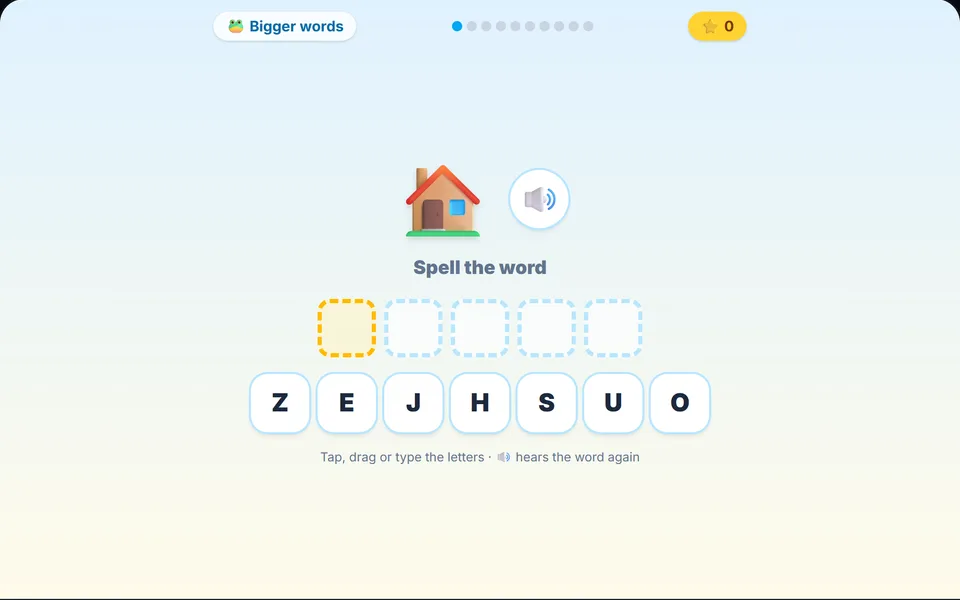
Build the word for the picture.
About Spell It!
See a picture, hear the word, and drag the letters into the right order. Three levels from three-letter words to tricky spellings, with gentle hints and a happy sound for every word.
Controls
- ▸Tap or drag letters into the boxes
- ▸Type the letters on a keyboard
- ▸Speaker button repeats the word
- ▸P or Esc to pause
- Difficulty
- ★★★★★
- Session
- ~4 min
- Plays
- 0
- Time played
- 0 min
How to play Spell It!
Spell It! shows a picture, says the word out loud and gives your child a set of letter tiles to tap in order, drag into the boxes or type on a keyboard. Pick a level first: Little words (three letters, like cat), Bigger words (four or five letters, like frog) or Big words (six to eight letters, like giraffe).
Each round has ten words. A wrong letter just wiggles and stays put, so every word can be finished, and after two wrong tries the next letter appears faintly as a hint. A word with no mistakes is a Perfect and earns full points (10, 20 or 30, depending on the level); otherwise it earns half. The speaker button repeats the word.
Tips
- ▸Start with Little words. Level 1 gives only the letters in the word, while the higher levels add two extra letters that aren't needed.
- ▸Sound the word out together before tapping, such as c-a-t, so your child builds the word rather than trying tiles one by one.
- ▸If the word isn't spoken, check the game isn't muted or press the speaker button. The voice is your browser's built-in speech, so it varies between devices.
- ▸Aim for Perfects: the end screen shows how many of the ten words had no mistakes.
Spell It! FAQ
- Which words are in Spell It!?
- Each level has 30 everyday picture words, such as animals, food, toys and vehicles. Every round picks ten of them at random.
- Can my child get stuck on a word?
- No. Wrong letters are simply not placed, a hint appears after two misses, and the only difference is half points for that word.
- Can my child type the letters?
- Yes. Pressing a letter key picks the matching tile, which is good typing practice. On phones and tablets, tap or drag the tiles instead.