Lights Out Puzzle Online💡Lights Out
Turn every light off.
About Lights Out
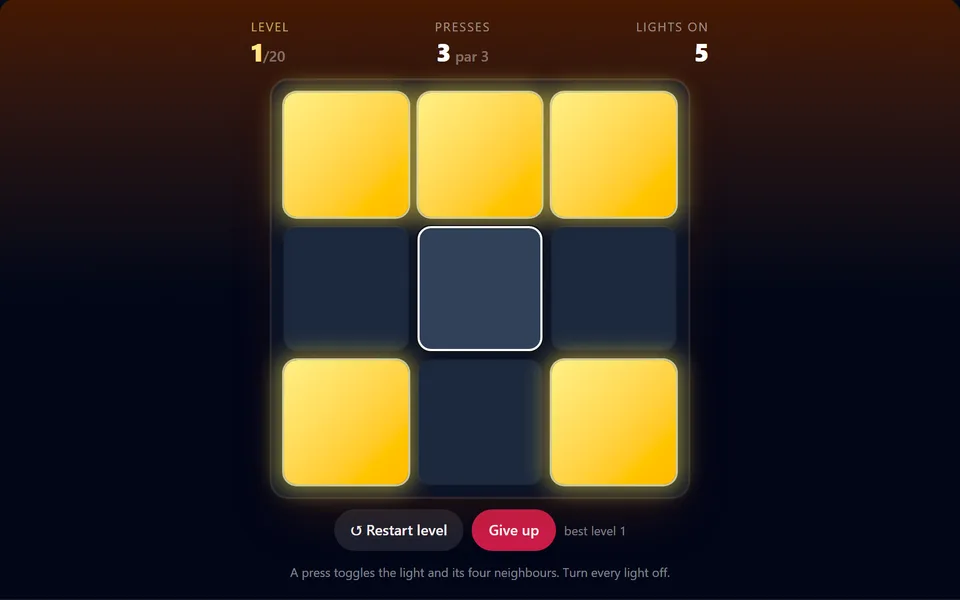
Pressing a light toggles it and its four neighbours. Switch all the lights off to clear the level, and match the par for a perfect. Levels grow from easy 3x3 boards to devious 7x7 grids.
Controls
- ▸Click or tap a light
- ▸P or Esc to pause
- Difficulty
- ★★★★★
- Session
- ~3 min
- Plays
- 0
- Time played
- 0 min
How to play Lights Out
Every square is a light that is either on or off. Pressing a light toggles it and the lights directly above, below, left and right of it; diagonals don't change. Switch every light off to clear the level. Click or tap a square to press it, and keep an eye on the counters for lights still on and presses used.
There are 20 levels, starting on 3x3 boards and growing by one size every four levels up to 7x7. Each board is built by pressing random squares on a dark grid, so it's always solvable, and par is the number of presses used to build it. Restart level resets the board, Give up ends the run, and your score is the level you reach.
Tips
- ▸Order doesn't matter, and pressing a light twice cancels out, so no square ever needs more than one press.
- ▸Try light chasing: working down from the top row, press the square below every lit light. Only the bottom row will be left.
- ▸Then note the bottom pattern, press a square or two in the top row and chase again. Practise on 3x3 to learn which presses fix what.
Lights Out FAQ
- Is every Lights Out level solvable?
- Yes. Each level is made by pressing random squares on an all-off board, so pressing those same squares again switches everything off.
- What happens if I go over par?
- Nothing bad. You still move on; clearing a level in par or fewer presses just earns a perfect.
- How many levels are there?
- Twenty, from 3x3 boards up to 7x7. Clearing level 20 completes the game.
- Can I play Lights Out on my phone?
- Yes, just tap the lights. The board resizes to fit your screen.